
Updated experience
2 min read
Stacker's new look
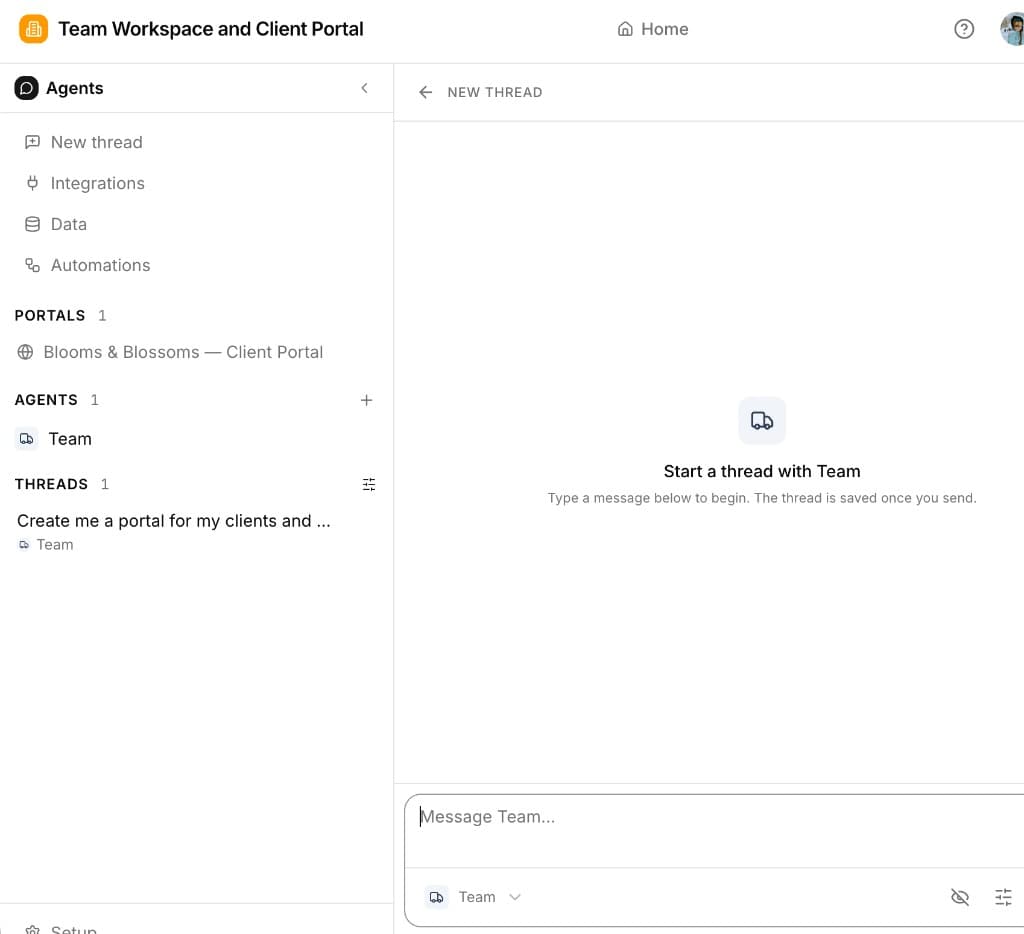
We redesigned the builder around AI agents and chat threads — one workspace where your team shapes portals, configures agents, and manages data together.
In short: Stacker is still your workspace for apps, data, and customer portals — but the builder now centers on threads (AI chat) and worker agents (configurable coworkers). Portals, agents, and admin all share the same underlying tables.
What changed
One builder for everything
Open an app and you'll see Portals, Agents, and Threads in the sidebar — plus Setup for data, permissions, and connectors. No more jumping between disconnected tools; the preview, chat, and config live in the same place. See Core Concepts.
Build through chat threads
Most changes start in a thread: describe what you want and the AI updates portal pages, schema, or agent settings. You can still edit directly in Setup when you prefer. Try the walkthrough in Threads & Agents.
Worker agents as coworkers
Create multiple agents per app — each with its own instructions, tools, channels (Slack, email, webhooks), and schedules. Agents read and write your app data, send messages, and run proactively on heartbeat. Start with AI Agents overview.
Same data, clearer surfaces
Admin grids, portal pages, and agent tools all operate on the same records. User permissions and row-level rules still govern what each audience sees — the model hasn't changed, just how you navigate and build around it.